Tuesday, October 6, 2009

Reveal the passwords behind ****


Ever wanted to know what is behind those ************{password} in any application.for example if you want see and know a password in your yahoo messenger that somebody else have typed and left it or in any other application.

Here is how you do it…

just download Spine pass view 07 from this url

Download Spine pass viewl

Simply drag the hand over the *** in a text box to reveal the password! Simple, small, quick and free.

CATCH 1:-when you start this application the asterisk writing capability of your system is disabled.

CATCH 2:-some anti virus softwares consider this software as a virus and delete it as soon as loaded so if you want this thing to work then disable your anti virus for sometime.

Note:Use it carefully, disabling the anti virus is not safe.

How to find IP Address and Location of an Orkut Profile User

First Step, Create a Blog. I would use blogger in this example, but you may use any blog which allows embedding HTML and JavaScript Codes. Don't use a popular blog which gets many hits because it would be hard to track the user of the Orkut ProfileCreate a StatCounter Account and "Add new Project". Setup is very simple you just need your blog address and access rights.Install the StatCounter code in your blog, you have two methods one is in the StatCounter Website and other is manually embedding the code. For both you have to click Install Code after you have successfully added the project.Your Code would look something like this.

Code corrupted. Insert fresh copy.
You have to install that in your blog as in the illustration below.Now the final step. You just have to compose a convincing enough message for your target to click on (Not very hard eh!). It can be through Scrap or Community whatever way you can get through. If you cannot contact or get the person to click on the link then this method would not work.Once he/she click it, a detailed record would come up in the StatCounter Website.
If the target has been harassing you or doing something illegal, you may contact the police and get more details from the ISP. Now you all know it! :)
~~The End~~

Sunday, October 4, 2009

Domain Hijacking – Website Hacking


Domain hijackingIn this post I will tell you about how the domain names are hacked and how they can be protected. The act of hacking domain names is commonly known as Domain Hijacking. For most of you, the term “domain hijacking” may seem to be like an alien. So let me first tell you what domain hijacking is all about.
Domain hijacking is a process by which Internet Domain Names are stolen from it’s legitimate owners. Domain hijacking is also known as domain theft. Before we can proceed to know how to hijack domain names, it is necessary to understand how the domain names operate and how they get associated with a particular web server (website).
The operation of domain name is as follows
Any website say for example gohacking.com consists of two parts. The domain name (gohacking.com) and the web hosting server where the files of the website are actually hosted. In reality, the domain name and the web hosting server (web server) are two different parts and hence they must be integrated before a website can operate successfully. The integration of domain name with the web hosting server is done as follows.
1. After registering a new domain name, we get a control panel where in we can have a full control of the domain.
2. From this domain control panel, we point our domain name to the web server where the website’s files are actually hosted.
For a clear understanding let me take up a small example.
John registers a new domain “abc.com” from an X domain registration company. He also purchases a hosting plan from Y hosting company. He uploads all of his files (.html, .php, javascripts etc.) to his web server (at Y). From the domain control panel (of X) he configures his domain name “abc.com” to point to his web server (of Y). Now whenever an Internet user types “abc.com”, the domain name “abc.com” is resolved to the target web server and the web page is displayed. This is how a website actually works.
What happens when a domain is hijacked
Now let’s see what happens when a domain name is hijacked. To hijack a domain name you just need to get access to the domain control panel and point the domain name to some other web server other than the original one. So to hijack a domain you need not gain access to the target web server.
For example, a hacker gets access to the domain control panel of  “abc.com”. From here the hacker re-configures the domain name to point it to some other web server (Z). Now whenever an Internet user tries to access “abc.com” he is taken to the hacker’s website (Z) and not to John’s original site (Y).
In this case the John’s domain name (abc.com) is said to be hijacked.
How the domain names are hijacked
To hijack a domain name, it’s necessary to gain access to the domain control panel of the target domain. For this you need the following ingredients
1. The domain registrar name for the target domain.
2. The administrative email address associated with the target domain.
These information can be obtained by accessing the WHOIS data of the target domain. To get access the WHOIS data, goto whois.domaintools.com, enter the target domain name and click on Lookup. Once the whois data is loaded, scroll down and you’ll see Whois Record. Under this you’ll get the “Administrative contact email address”.
To get the domain registrar name, look for something like this under the Whois Record. “Registration Service Provided By: XYZ Company”. Here XYZ Company is the domain registrar. In case if you don’t find this, then scroll up and you’ll see ICANN Registrar under the “Registry Data”. In this case, the ICANN registrar is the actual domain registrar.
The administrative email address associated with the domain is the backdoor to hijack the domain name. It is the key to unlock the domain control panel. So to take full control of the domain, the hacker will hack the administrative email associated with it. Email hacking has been discussed in my previous post how to hack an email account.
Once the hacker take full control of this email account, he will visit the domain registrar’s website and click on forgot password in the login page. There he will be asked to enter either the domain name or the administrative email address to initiate the password reset process. Once this is done all the details to reset the password will be sent to the administrative email address. Since the hacker has the access to this email account he can easily reset the password of domain control panel. After resetting the password, he logs into the control panel with the new password and from there he can hijack the domain within minutes.
How to protect the domain name from being hijacked
The best way to protect the domain name is to protect the administrative email account associated with the domain. If you loose this email account, you loose your domain. So refer my previous post on how to protect your email account from being hacked. Another best way to protect your domain is to go for private domain registration. When you register a domain name using the private registration option, all your personal details such as your name, address, phone and administrative email address are hidden from the public. So when a hacker performs a WHOIS lookup for you domain name, he will not be able to find your name, phone and administrative email address. So the private registration provides an extra security and protects your privacy. Private domain registration costs a bit extra amount but is really worth for it’s advantages. Every domain registrar provides an option to go for private registration, so when you purchase a new domain make sure that you select the private registration option.

Know More About Secure Sockets Layer (SSL)


Secure Sockets Layer (SSL) is the most widely used technology for providing a secure communication between the web client and the web server. Most of us are familiar with many sites such as Gmail, Yahoo etc. using https protocol in their login pages. When we see this, we may wonder what’s the difference between http and https. In simple words HTTP protocol is used for standard communication between the Web server and the client. HTTPS is used for a SECURE communication.

What exactly is Secure Communication ?

Suppose there exists two communication parties A (client) and B (server).
Working of HTTP
When A sends a message to B, the message is sent as a plain text in an unencrypted manner. This is acceptable in normal situations where the messages exchanged are not confidential. But imagine a situation where A sends a PASSWORD to B. In this case, the password is also sent as a plain text. This has a serious security problem because, if an intruder (hacker) can gain unauthorised access to the ongoing communication between A and B , he can see the PASSWORDS since they remain unencrypted. This scenario is illustrated using the following figure

Now lets see the working of HTTPS
When A sends a PASSWORD (say “mypass“) to B, the message is sent in an encrypted format. The encrypted message is decrypted on B’s side. So even if the Hacker gains an unauthorised access to the ongoing communication between A and B he gets only the encrypted password (”xz54p6kd“) and not the original password. This is shown below


How is HTTPS implemented ?

HTTPS is implemented using Secure Sockets Layer (SSL).A website can implement HTTPS by purchasing an SSL Certificate. Secure Sockets Layer (SSL) technology protects a Web site and makes it easy for the Web site visitors to trust it. It has the following uses
  1. An SSL Certificate enables encryption of sensitive information during online transactions.
  2. Each SSL Certificate contains unique, authenticated information about the certificate owner.
  3. A Certificate Authority verifies the identity of the certificate owner when it is issued.
How Encryption Works ?
Each SSL Certificate consists of a Public key and a Private key. The public key is used to encrypt the information and the private key is used to decrypt it. When your browser connects to a secure domain, the server sends a Public key to the browser to perform the encryption. The public key is made available to every one but the private key(used for decryption) is kept secret. So during a secure communication, the browser encrypts the message using the public key and sends it to the server. The message is decrypted on the server side using the Private key(Secret key).
How to identify a Secure Connection ?
In Internet Explorer, you will see a lock icon Picture of the Lock icon in the Security Status bar. The Security Status bar is located on the right side of the Address bar.You can click the lock to view the identity of the website.
In high-security browsers, the authenticated organization name is prominently displayed and the address bar turns GREEN when an Extended Validation SSL Certificate is detected. If the information does not match or the certificate has expired, the browser displays an error message or warning and the status bar may turn RED.
So the bottom line is, whenever you perform an online transaction such as Credit card payment, Bank login or Email login always ensure that you have a secure communication. A secure communication is a must in these situations.Otherwise there are chances of Phishing using a Fake login Page.
I Hope this helps.Please pass your comments.

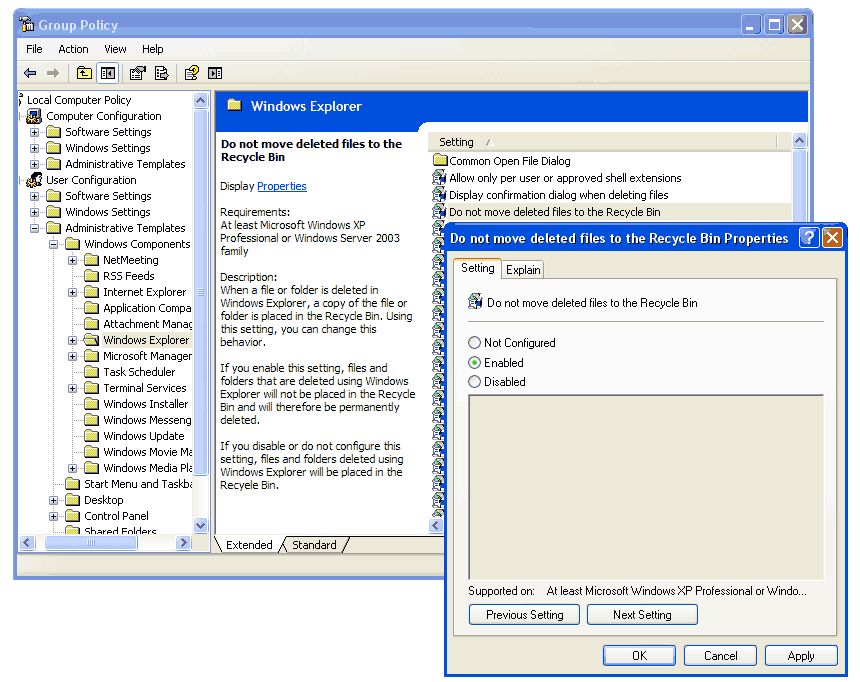
How to delete files without sending them to Recycle Bin

You can simply use Shift+Delete instead of Delete, or you can use the following method, and even if you delete them with Delete, the files won't go to Recycle Bin:
1. Go to run, type gpedit.msc and press enter
2. Go to User Configuration -> Administrative Templates -> Windows Components -> Windows Explorer
3. Find the Do not move deleted files to the Recycle Bin setting
4. Double click it, check Enabled and press OK

Thursday, October 1, 2009

Rats Versions (sub7)

About Rats

If u dont know about Rats
here is the ans


what's is a rat ?

RAT (Remote administrative tool) so this means u can control a computer far away of your office or house and use functions like: Controls his/her desktop of the victim( the victim is the pesron who computer is infected with the server), capture desktop, captute his/her webcam File Manager: upload files to the server computer, download files, delete files, run files, mk dirs everything about file manager, kill processes, manage services, restrictions, register editor in online, Passwords: get cached passwords: serials and more, And many functions more!!

Rats


Rat II


Illusion

Fud Rat


File Info

Report generated: 20.10.2008 at 16.25.13 (GMT 1)
Filename: setup.exe
File size: 2464 KB
PEiD: Microsoft Visual C++ 6.0 [Overlay]
MD5 Hash: 1612E96B9927B295BB844F1388A90DB6
SHA1 Hash: FA04DDE6828745B53D6DA612AE1A31F365809A75
Binder Detector: Nothing found

Detections

A-Squared - Nothing found!
Antivir - Nothing found!
Avast - Nothing found!
AVG - Nothing found!
BitDefender - Nothing found!
ClamWin - Nothing found!
Comodo - Nothing found!
Dr.Web - Nothing found!
Ewido - Nothing found!
F-PROT 6 - Nothing found!
G DATA - Nothing found!
IkarusT3 - Nothing found!
Kaspersky - Nothing found!
McAfee - Nothing found!
NOD32 - Nothing found!
Norman - Nothing found!
Panda - Nothing found!
QuickHeal - Nothing found!
Solo Antivirus - Nothing found!
Sophos - Nothing found!
TrendMicro - Nothing found!
VBA32 - Nothing found!
Virus Buster - Nothing found!

Scan report generated by
NoVirusThanks.org
Download::
http://rapidshare.com/files/155823591/illusion.rar


NetDevil


Optix Pro


Prorat


Download
http://rapidshare.com/files/119647407/ProRatSE.rar.html

Password-oksa52wq
Username: kodijase1
Serial: 66617e872accfc4f97


The post is continued on link

Change Your Processor Name


SHOW YOUR PC PENTIUM 5 OR MORE
GO TO START>RUN>TYPE REGEDIT>HKEY_LOCAL_MACHINE>HARDWARE>DISCRIPTION>SYSTEM>CENTRAL
PROCESSOR>ON RIGHT HAND SIDE RIGHT CLICK ON PROCESSOR NAME AND STRING AND THE CLICK ON
MODIFY AND WRITE WHAT EVER YOU WANT.


Will work only wid XP. Dis ones a bit old but gud...